
Meet Entry Instructions for Swimmers
Log in to the website. Login is found in the upper right hand corner of the screen.
Swimmer Event Signup
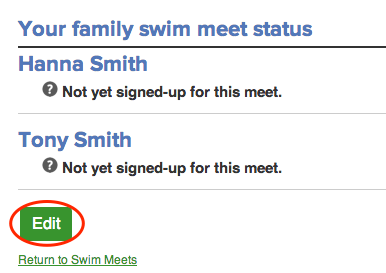
- Under the Meets & Events tab, select "Event Calendar" to sign up for a swim meet or click here: Meets & Events>Event Calendar. Then click on the green MEET ENTRY tab, and then click the Edit tab under your athletes' names.
Example:
Text Area
Simple formatted text


Image
Upload and embed an image
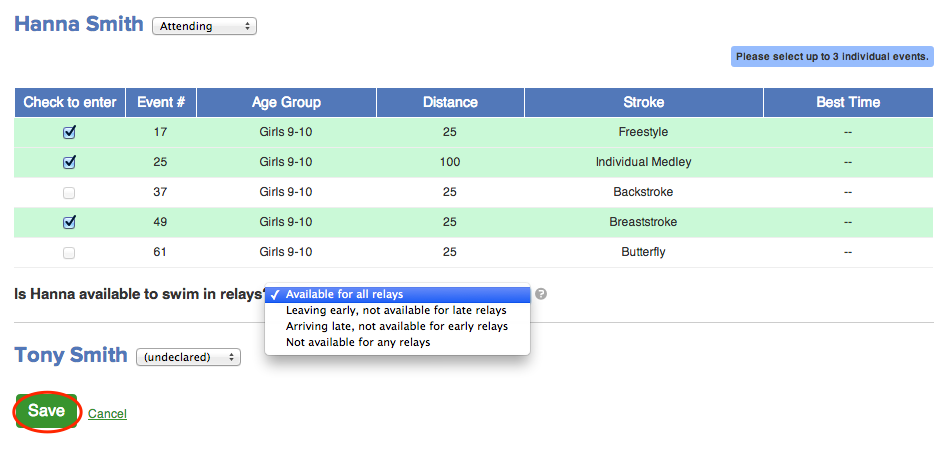
- For each of your athletes, select an option from the drop down list next to their names.
- Attending
- Not Attending
It is very important that you select one of the above options so the coach can get all entries done. Swimmers are not required to swim at the meets, but please select the second option if your swimmer will not attend
Example:
Text Area
Simple formatted text
Image
Upload and embed an image
- Select up to three individual events from the list shown.
- If you are not sure about individual events, you may leave the events blank and the coach will help with that decision. Please note that while parents have the option to indicate preferred events, the entry decisions are ultimately made by the coaches.
- Once you select your individual events, please declare your relay status. There is a pull down menu under individual events with the following options:
- Available for all relays (can swim in one or both relays)
- Arriving late-not available for early relays (early relay is Medley Relay)
- Leaving early-not available for late relays (late relay is Free Relay)
- Not available for any relays.
- The swimmers who will swim in the relays are determined solely by the coaches and are only subject to change at the discretion of the coaches. Note: Your swimmer may end up not swimming in a relay, even if they declared that they are available. Sometimes there is not space in the meet for more than 1-2 relays.
- Click Save to record your choices.
The deadline for signing up for events online is generally 2-3 days prior to meet.
Should you have any questions about the sign-up process or which events to enter your child in, please email the team at [email protected].
Text Area
Simple formatted text




